
 Pro náš vývojářský tým hledáme nové spolupracovníky – programátory. Máte-li zájem spolupodílet se na vývoji sw produktů pro velké a význačné zákazníky, jste pravými kandidáty na tuto pozici. Celý příspěvek
IT: služby, které vám můžeme poskytnout
 Naše firma působí v oboru informačních technologií (IT) a jako taková je schopná poskytnout vám široké spektrum služeb týkajících se uvedené oblasti.
Převažující činností je vývoj zakázkového software. To v sobě zahrnuje analýzu a definici potřeb zákazníka, přípravu a diskusi návrhu a pilotní části aplikace, uvedeni do provozu a konečně údržbu hotové aplikace a klientský servis.
Management technických dílů
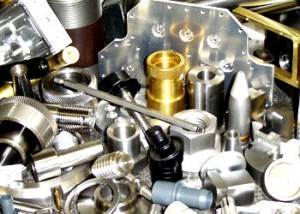 Nabízené řešení z oblasti managementu technických dílů je založeno na software německé firmy CADENAS GmbH. V tuzemsku je určitá varianta tohoto řešení známá pod názvem PARTsolutions. V tomto případě jde o aplikaci obsahující 3D modely standardně využívaných technických dílů (zejména strojírenských) a využívanou zejména konstruktéry ve spojení s CAD programy. V obecném pohledu se však jedná o škálovatelné řešení využitelné ve všech oblastech managementu dílů, tedy v odděleních nákupu, technické a technologické přípravy výroby, konstrukce, skladování a dalších.
Celý příspěvek
eXpertClaim / ADAM
 eXpertClaim / ADAM (ADjust A claiM) je vysoce sofistikovaný software určený pro likvidaci škod na vozidlech. Primárně je tedy určen pro pojišťovny.
Program umí evidovat jednotlivé případy škody, definovat rozsah pojištění, provést kalkulaci škody a evidovat veškeré další operace související s workflow likvidace škodní události.
Wacom tutorial
 Představitelem realizovaných multimediálních aplikací je řada tutorialů pro firmu Wacom. Jde o interaktivní aplikace prezentující uživateli způsob práce s tablety. Protože jsou tablety Wacom na špičce technického vývoje, jsou tutorialy dobrou a uživatelsky přívětivou formou, jak uživateli přiblížit jejich široké spektrum vlastností a možností ovládání jak pomocí gest (touch funkce), tak pomocí pera.
Aplikace realizovaná v Adobe Directoru podporuje 13 světových jazyků, rozpoznává typ připojeného tabletu a s ohledem na to pak prezentuje odpovídající funkce. Prezentace včetně interaktivních částí je provázena mluveným výkladem. Tutorialy jsou dodávány jak pro systém Windows, tak pro MacOS.
Sandvik software pro management kvality
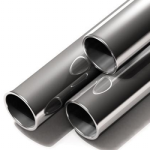 Pro firmu Sandvik Chomutov Precison Tubes s.r.o. jsme vytvořili systém používaný v oblasti managementu kvality. V tomto systému jsou evidovány záznamy o materiálech použitých k výrobě trub včetně záznamů o následně provedených laboratorních zkouškách. Struktura informací a vzájemné provázanosti jednotlivých záznamů je zde poměrně složitá – některé údaje jsou specifické pro celou materiálovou dávku (lot), některé pak pro konkrétní objednávku či výrobní balení. Systém je nasazen jako síťová aplikace a mj. automaticky upozorňuje, nejsou li laboratorně zjištěné hodnoty v definovaných mezích.
Celý příspěvek